
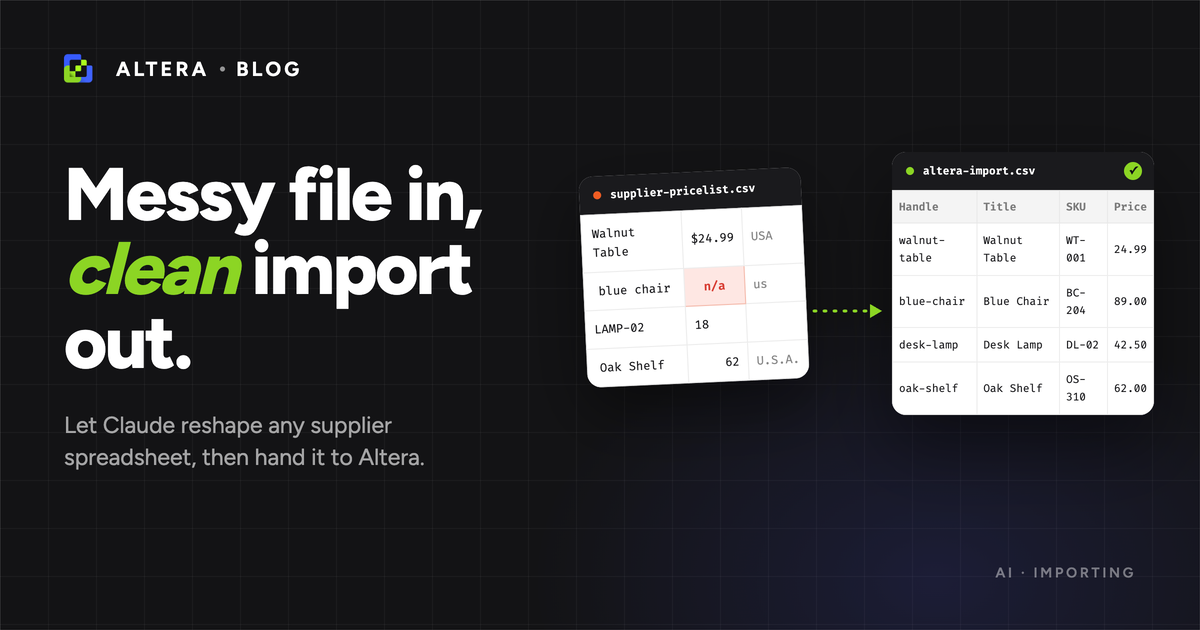
A supplier emails you a price list. It opens fine in Excel and is wrong for Shopify in every way that matters. You upload it anyway, half the rows fail, and now you’re hand-editing a spreadsheet at 11pm, renaming headers and splitting columns by hand.
The job splits in two. One half is judgment: reading that “Colour” means an option, that four rows are one product, that $24.99 should be 24.99, and which rows are too ambiguous to touch. The other half is mechanical: converting country names, validating every row, keeping a copy you can roll back to. The first is what Claude is good at. The second is the kind of thing software should just do, the same way every time. So let Claude reshape the file, let Altera handle the import, and keep the judgment calls yourself.
We’ve covered connecting Claude to Altera and moving order history with a CSV before. This is the messy-file version: you start with a spreadsheet that has nothing to do with Shopify and end with products in your store.
Short version: upload the supplier file, ask Claude for a mapping and a list of what it’s unsure about before it changes a thing, approve it, let Claude build the clean file, export your current products as a backup, import as a draft, read the results preview, then publish.
This all runs in a chat, so connect Altera to Claude as an MCP connector first. The setup guide walks through it in a couple of minutes.
Let’s walk through an example#
The whole thing happens inside Claude: you upload the supplier file straight into the chat, and Claude reads it, reshapes it, and only pushes anything to your store at the final import step. Here’s the file we’ll use (supplier-pricelist.csv): ten products from a fictional homewares supplier, with nearly every common mess baked in. Download it and follow along on a development store.
| Item | Colour | Size | SKU | Barcode | Price | Qty | Made In |
|---|---|---|---|---|---|---|---|
| Classic Tee | Red | S | TEE-RED-S | 0040232121 | $24.99 | 12 | USA |
| Classic Tee | Red | M | TEE-RED-M | 0040232122 | $24.99 | 8 | USA |
| Classic Tee | Red | L | TEE-RED-L | 0040232123 | $24.99 | 0 | USA |
| Classic Tee | Blue | S | TEE-BLU-S | 0040232124 | $24.99 | 15 | United States |
| Enamel Mug | n/a | n/a | MUG-001 | 0040555001 | $14.00 | 40 | China |
| Enamel Mug | n/a | n/a | MUG-001 | 0040555001 | $14.00 | 25 | China |
| Tote Bag | Natural | TOTE-NAT | 40777010 | 19.5 | 25 | india | |
| Tote Bag | Black | TOTE-BLK | 40777011 | 19.5 | India | ||
| Beanie | Grey | One Size | BEANIE-GRY | 0040888001 | $18 | 30 | Great Britain |
| TOTAL | $1,234.00 | 155 | |||||
Every problem in one file: a British “Colour” header, the Tee’s sizes spread across four rows, “n/a” where the Mug has no options, dollar signs and a thousands separator in prices, a leading-zero barcode beside one that lost its zeros, four spellings of two countries, a duplicate MUG-001 with two quantities, a missing quantity on TOTE-BLK, and a TOTAL row and blank row that are junk. The downloadable file also carries Cost, Category, Description, and Image columns, dropped here for width.
Step 1: Point Claude at the right shop#
Quick confirmation, so you’re not about to import into the wrong store.
Use Altera. Which shop am I connected to?Claude calls the connector and reports the store. If it’s the right one, carry on.
Step 2: Ask Claude for a plan, not a result#
Drag the supplier file into the Claude chat. Then, before it builds anything, make Claude show its mapping: you’re asking for its plan, not the file, so you can catch a bad assumption while it’s still cheap to fix.
I've uploaded a supplier spreadsheet. Before you build anything, look up Altera's
product field reference to confirm the exact column names. Then give me two things only:
a column mapping table (my column, Altera column, one short note), and a short list of
any rows or values you can't safely decide. Keep grouping to one line. No other
commentary, and don't build the file yet.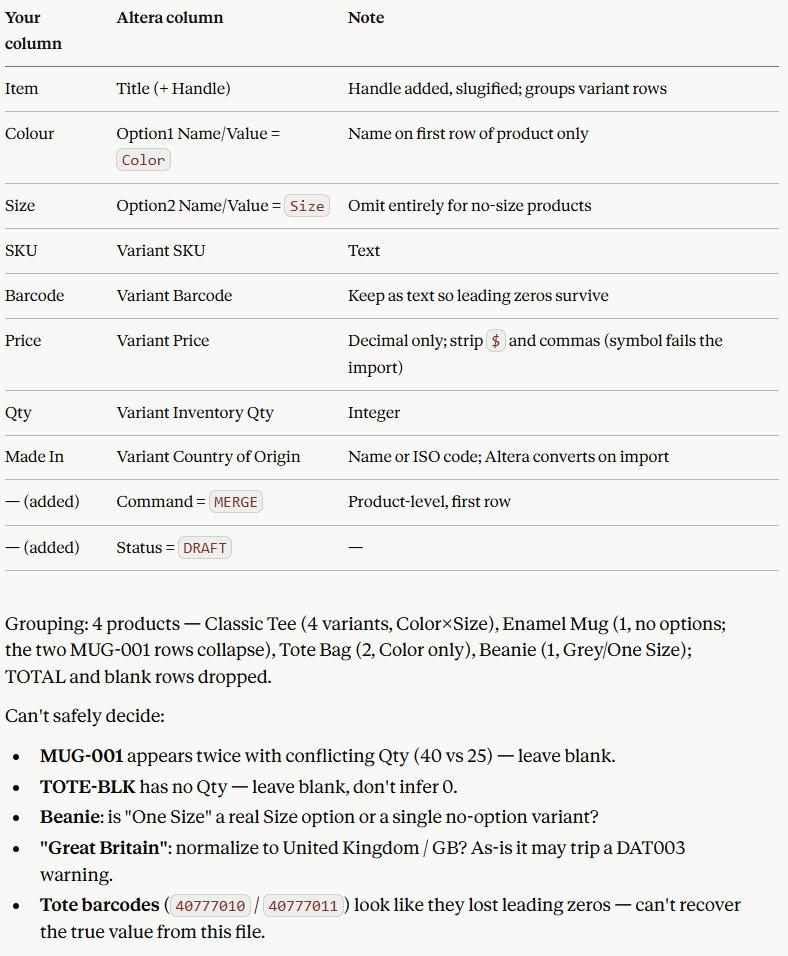
The reference-lookup line matters: left to guess, a model will invent a column name that looks right and isn’t. Pointing it at Altera’s product field reference first keeps the headers real. Read the mapping and the flags before moving on.
Step 3: Approve the mapping, then build the file#
When the plan looks right, turn it into the file. Spell out the formatting rules so nothing is left to chance.
Mapping looks good. Build the cleaned file in Altera/Matrixify product format:
- group the variants under one Handle,
- carry over every column from my file, including the description and image,
- set Command to MERGE and Status to draft,
- strip currency symbols and thousands separators from prices,
- keep barcodes as text so leading zeros survive,
- standardize the country names.
For anything you flagged, leave the cell blank and list it again at the bottom.Claude builds the file and shows it back to you. Here’s the same data, reshaped into a clean Altera import, with the flagged cells left blank on purpose:
| Handle | Title | Option1 | Option2 | Variant SKU | Barcode | Price | Qty | Country | Cmd |
|---|---|---|---|---|---|---|---|---|---|
| classic-tee | Classic Tee | Red | S | TEE-RED-S | 0040232121 | 24.99 | 12 | United States | MERGE |
| classic-tee | Red | M | TEE-RED-M | 0040232122 | 24.99 | 8 | United States | ||
| classic-tee | Red | L | TEE-RED-L | 0040232123 | 24.99 | 0 | United States | ||
| classic-tee | Blue | S | TEE-BLU-S | 0040232124 | 24.99 | 15 | United States | ||
| enamel-mug | Enamel Mug | MUG-001 | 0040555001 | 14.00 | * | China | MERGE | ||
| tote-bag | Tote Bag | Natural | TOTE-NAT | 40777010 | 19.50 | 25 | India | MERGE | |
| tote-bag | Black | TOTE-BLK | 40777011 | 19.50 | * | India | |||
| beanie | Beanie | Grey | One Size | BEANIE-GRY | 0040888001 | 18.00 | 30 | United Kingdom | MERGE |
Option1 is Color, Option2 is Size; product-level fields sit on the first row of each product, the Matrixify convention. Description, image, type, and cost carry across too, hidden here for width. Prices lost their symbols, barcodes kept their zeros, countries are normalized, the Mug collapsed to one variant, and the junk rows are gone. The cells marked * are values Claude wouldn’t guess, so it left them blank for you (Step 4).
Step 4: Make the judgment calls Claude flagged#
Two of the flags are real decisions, both about inventory. MUG-001 appeared twice with conflicting quantities (40 and 25), and TOTE-BLK arrived with none. Claude didn’t average them or assume zero; it left both blank and said so, because inventory is exactly the number you don’t want an agent inventing. Decide the real figures, or leave inventory out of this import so Shopify’s existing quantities aren’t touched.
The rest are safe to wave through. “One Size” is a real Size option, so the Beanie keeps it. “Great Britain” normalizes to United Kingdom, though Altera would accept it on import either way. And the Tote barcodes that lost their leading zeros can’t be recovered from this file, so accept them as-is or ask the supplier for the originals. Tell Claude your calls and it updates the file.
The Tee’s size L at 0 is worth a look too, though Claude didn’t flag it: sold out or just unstocked is a Continue vs Deny decision, not a cleanup one. The TOTAL and blank rows were dropped, and reported as dropped, not silently.
Step 5: Back up, then import as a draft#
One message to take a backup first. This export is your undo button, so don’t skip it.
Before we import, use Altera to export my current products so I have a file to roll back to.Then the import. Match on Handle, MERGE so other fields stay untouched, and import as a draft so nothing goes live until you’ve looked.
These look right. Import the cleaned file as a draft, matched on Handle with Command
MERGE, and show me the results preview.Claude shows the results inline: how many products were created or updated, and any row that came back with a warning instead of success. Read it, fix anything it flags, then re-export to confirm before flipping the products from draft to active.
Export the Handle, Title, and Variant SKU for the products we just imported so I can confirm they landed.A note on safety#
The export from the start of Step 5 is what makes this low-risk: if the import goes sideways, re-import that file and you’re back where you started. Cheap to keep, easy to forget, worth it the one time you need it.
Keeping the file lean helps too. A MERGE matched on Handle that includes only the columns you’re changing leaves everything else (prices, inventory, images, body copy) untouched. The agent can’t change what isn’t there. And Status set to draft gives even a clean-looking import one human look before customers see it. The agent doesn’t know what’s expensive to undo. You do.
Don’t make Claude do Altera’s job#
It’s tempting to ask Claude to handle every last fix. Don’t. Some of them Altera already does for you on import, and handing those to a model just adds a place for it to be subtly wrong:
- Country names: Altera recognizes USA, United States, Great Britain and the rest, and converts them on import. Letting Claude tidy them is fine; just don’t rely on it as the only thing catching a typo like “india”.
- Categories: Altera matches them by title, with a Google Shopping fallback, so Claude doesn’t need to know the full category list.
- Leading zeros: keep barcodes as text and they survive. A formatting rule, not a reasoning task.
- Collections: imports find existing collections by title, so Claude doesn’t need to look up IDs.
Claude’s job is the language and the grouping. Altera’s job is the conversions and the validation. Keep that line clean and both halves stay reliable.
What else this works for#
Same loop, different starting file:
- An Etsy export that won’t re-import cleanly. The mess is different, the pattern is identical.
- A recurring supplier feed: if the same file shows up weekly, move from a one-off chat to the CLI plus a saved transformation so it runs the same way every time.
- A Shopify admin export you’re trying to push back in. Altera flags these on upload; Claude reshapes them into a real import file.
- Several data types at once: products, then inventory, then prices, in the right order so each step has what it needs.
MCP or CLI for this?#
For a one-off file on a single shop, in a chat, the MCP is the right tool and the fastest to set up. For the same feed across a dozen client stores, or a repeatable script, the CLI is built for that. We compared the two in Altera MCP vs CLI: Which to Give Your AI Agent.
Works in Matrixify too#
The cleaned file itself is Matrixify-compatible. The columns Claude prepares (Handle, Variant SKU, Command, and the rest) are the same ones Matrixify uses, so the same file imports through either app, and an export from one can be reshaped and imported with the other. Altera is a Matrixify alternative that shares the spreadsheet format, plus data types Matrixify doesn’t cover.
Sample data: supplier-pricelist.csv (the messy ten-product file) and altera-import.csv (the cleaned version).