
Every Shopify product has an SEO title and a meta description, the two lines that show up in a Google result. If you never set them, Shopify fills them in for you: the title becomes the product name, and the description becomes the first 160-ish characters of your body copy, usually cut off mid-sentence. That’s fine on launch day and mediocre forever after.
Those two fields aren’t really separate from your metafields. They are metafields. Shopify keeps them as global.title_tag and global.description_tag, and Altera reads and writes them as the SEO Title and SEO Description columns. So “fix our SEO fields” is a metafield import, and writing 200 short, on-brand, character-limited lines from existing product copy is exactly the kind of job worth handing to an AI.
We’ve covered connecting Claude to Altera and generating a metafield template from your store before. This post is the end-to-end version for one specific, high-value job, run entirely in a chat window.
Short version: connect the MCP, ask Claude to export your products, have it draft the SEO fields under the character limits, read the table, import it back. A catalog you’d never get around to by hand, done in an afternoon.
Connect the Altera MCP#
You set this up once.
In Claude, open Settings > Connectors, add a custom connector, and enter the connector URL https://mcp.getaltera.com/mcp. Sign in to Altera, pick the shop, and authorize. The grant is per shop. Altera’s setup guide has the full walkthrough.
Follow along with the sample data#
Want to try this on throwaway data first? Here’s the exact product file used in this walkthrough (altera-seo-demo-products.xlsx): ten homewares products with real descriptions and no SEO fields set. Import it into a development store with Command MERGE and you’ll have the same starting point.
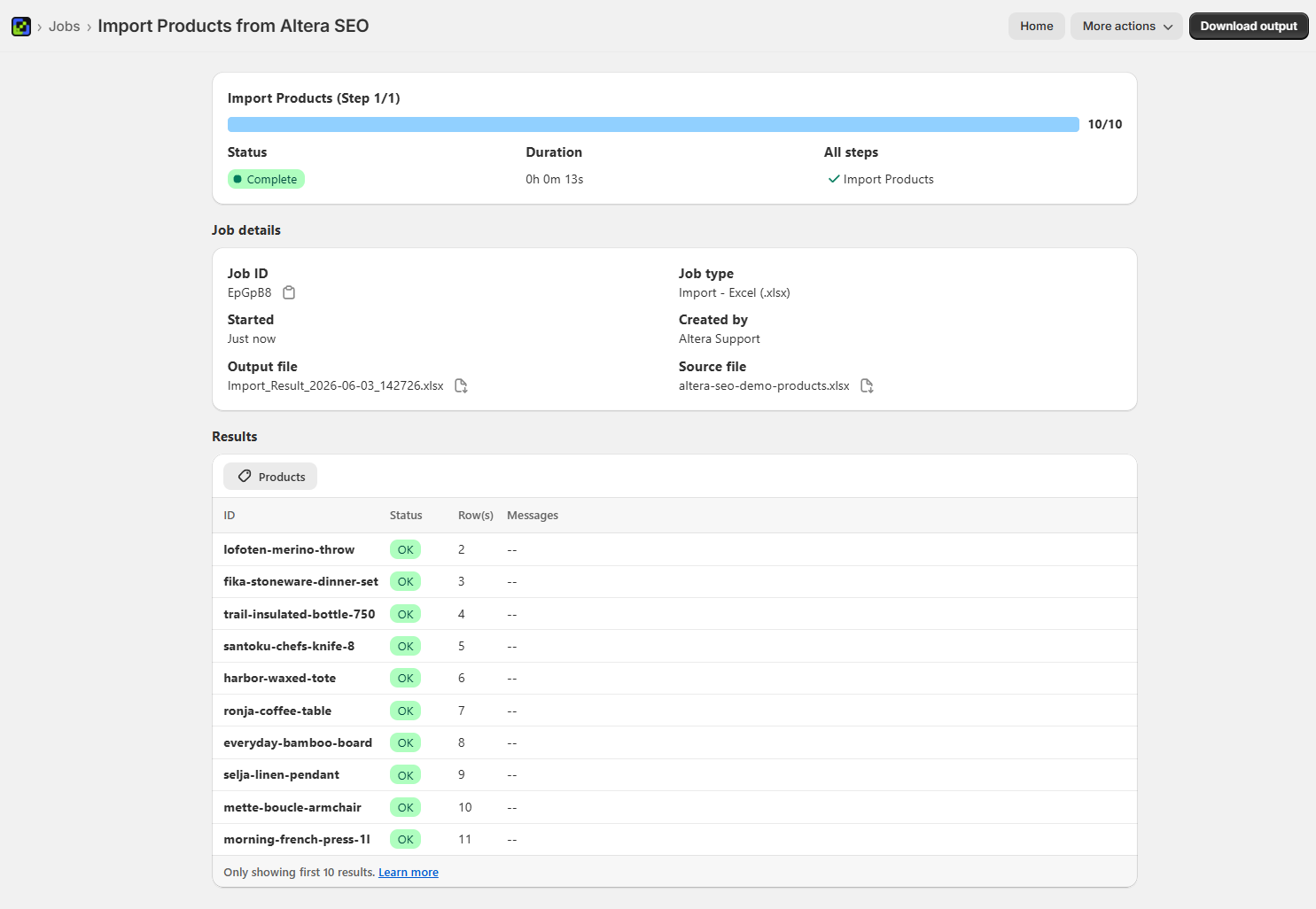
Step 1: Point Claude at the right shop#
Quick confirmation, so you’re not about to edit the wrong store.
Use Altera — which shop am I connected to?Claude calls the connector and reports the store. If it’s the right one, carry on.
Step 2: Export the products#
Ask for only the columns you need: the identifier, the source content, and the two SEO fields.
Use Altera to export all my products with these columns: Handle, Title,
Body HTML, SEO Title, and SEO Description. Then read the file so we can
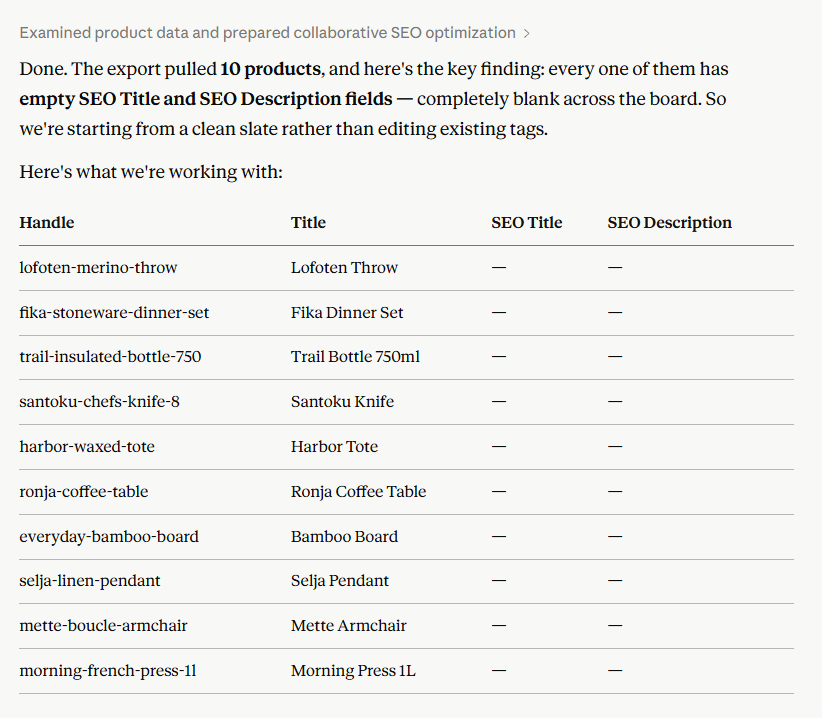
work on the SEO fields together.Claude creates the export, waits for it to finish, and reads it back. Expect the SEO Title and SEO Description columns to come back empty. That isn’t a bug. Shopify only auto-generates those two for display and doesn’t store a value until you set one, so empty across the board just means you’re starting from a clean slate.
Step 3: Draft the SEO fields, and read them before anything ships#
The part that matters is the constraints. Search results truncate title tags past roughly 60 characters and meta descriptions past about 155 to 160, so give Claude the limits, tell it to pull from the real description, and tell it not to write anything to the store yet.
For every product, write a new SEO title and meta description from its
title and description:
- SEO title: under 60 characters, include the product category and the
  brand "Alder & Co." (swap in your own brand)
- Meta description: 150 to 160 characters, specific and benefit-led, no
  keyword stuffing
Show me all ten in a table with character counts. Don't change anything
in the store yet.You get back a table you can actually review: every title and description with a character count beside it, and a note on which ones took a judgment call.
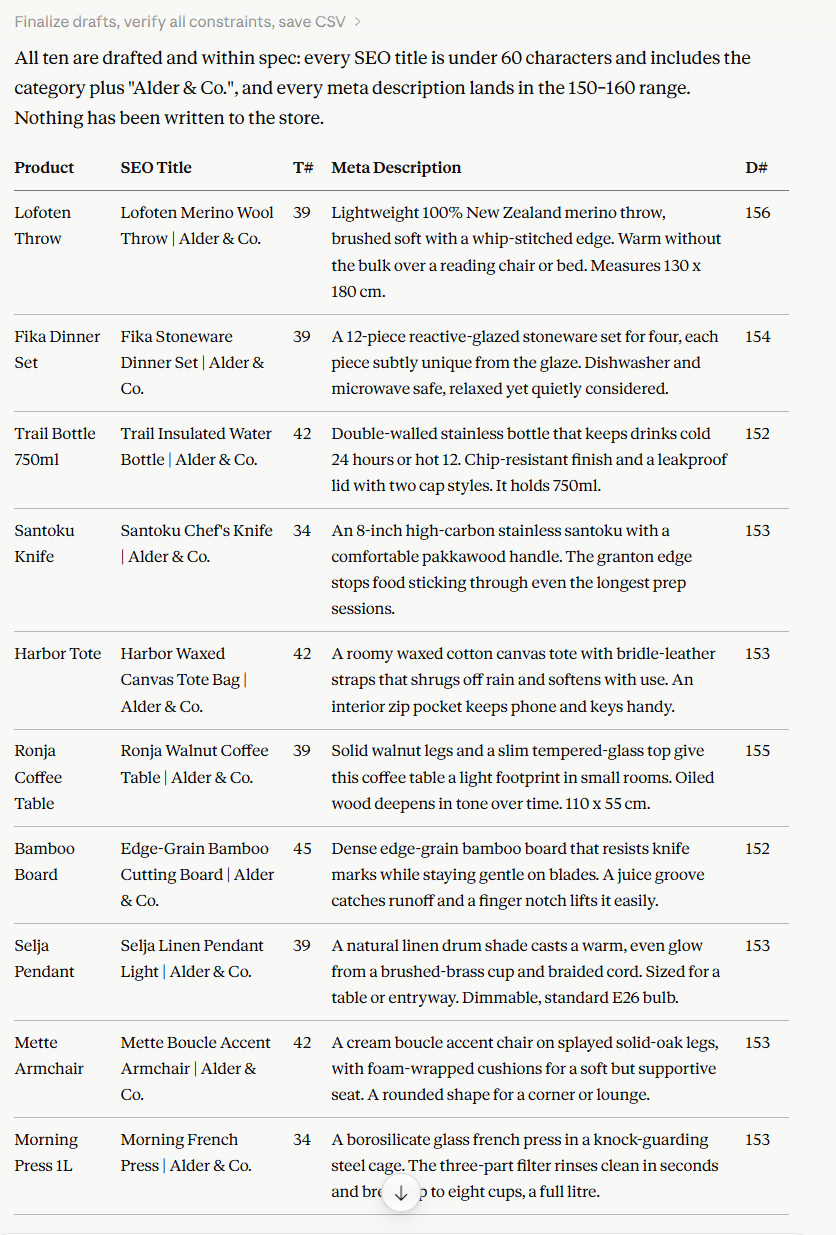
This is the step a person is good at and a model is not: deciding which products deserve a second look. The multi-material items are the obvious ones. A walnut table with a glass top, a linen shade on a brass fitting; each needs a primary keyword chosen, and that choice is worth a glance before it goes live. If one’s off, say so in plain language (“rewrite the coffee table one to lead with Walnut”) and Claude revises in place.
Step 4: Import it back#
When the drafts look right, the import is one message. Update only the two SEO columns, match on Handle, and use MERGE so nothing else on the product is touched.
These look good. Use Altera to import them back, updating only the SEO
Title and SEO Description columns, matched on Handle, with Command MERGE.Claude builds the file and uploads it through the connector itself, so you never download or re-upload anything. Before it writes, it shows a confirmation in the chat. That’s your last checkpoint. Approve it and the job runs.
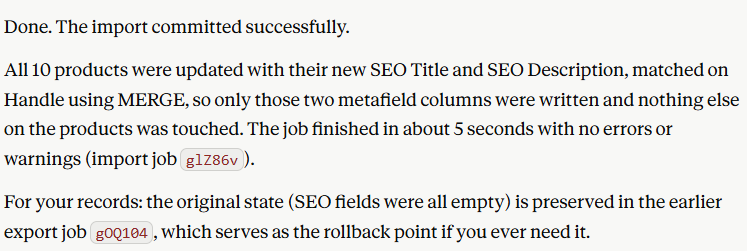
To confirm it saved, re-export the same fields or open a product in the admin and check the search engine listing preview. The generic auto-text should now be the version you wrote.
Export the Handle, SEO Title, and SEO Description for those products
again so I can confirm they saved.A note on safety#
The export you ran in Step 2, with the SEO columns empty, is your undo button. If a batch of descriptions reads worse than what Shopify was generating, re-import that original file and you’re back to the blank state. Cheap to keep, easy to forget, worth it the one time you need it.
The scoping helps too. A MERGE matched on Handle that includes only SEO Title and SEO Description means the rest of each product (the price, inventory, body copy, and images) is never in the import file and never at risk. The agent can’t change what isn’t there.
What else this works for#
Same loop, different fields:
- Image alt text, for accessibility and image search, written from what’s actually in each photo’s product.
- Care instructions or specs as a rich text metafield. Hand Claude the format and it writes the HTML; Altera converts it to Shopify’s JSON on import.
- Normalizing a messy metafield, like a color or material field where “Navy”, “navy blue”, and “#000080” all coexist, into consistent values.
- Filling a
custom.*metafield from information that’s already sitting in your descriptions but isn’t structured yet.
The pattern is always the same: export, let Claude do the language or judgment part, read the table, import. If you’d rather start from a correctly-shaped empty file, the metafield import template tool generates one from your store’s own definitions.
MCP or CLI for this?#
For a single shop and an in-chat session like this one, the MCP is the right tool, and it’s the fastest to set up. If you’re running the same pass across a dozen client stores, or wiring it into a repeatable script, the CLI is built for that instead. We compared the two in Altera MCP vs CLI: Which to Give Your AI Agent.
Works in Matrixify too#
The SEO Title and SEO Description columns are the same ones Matrixify uses, and they map to global.title_tag and global.description_tag on both sides, so a file Claude prepares through Altera imports cleanly through Matrixify and the other way around. Altera is a Matrixify alternative with a compatible spreadsheet format in both directions, plus a few data types Matrixify doesn’t cover.