
Shopify Import & Export.
Built for today.
The import/export tool that keeps up with Shopify. Matrixify compatible, with more data types.
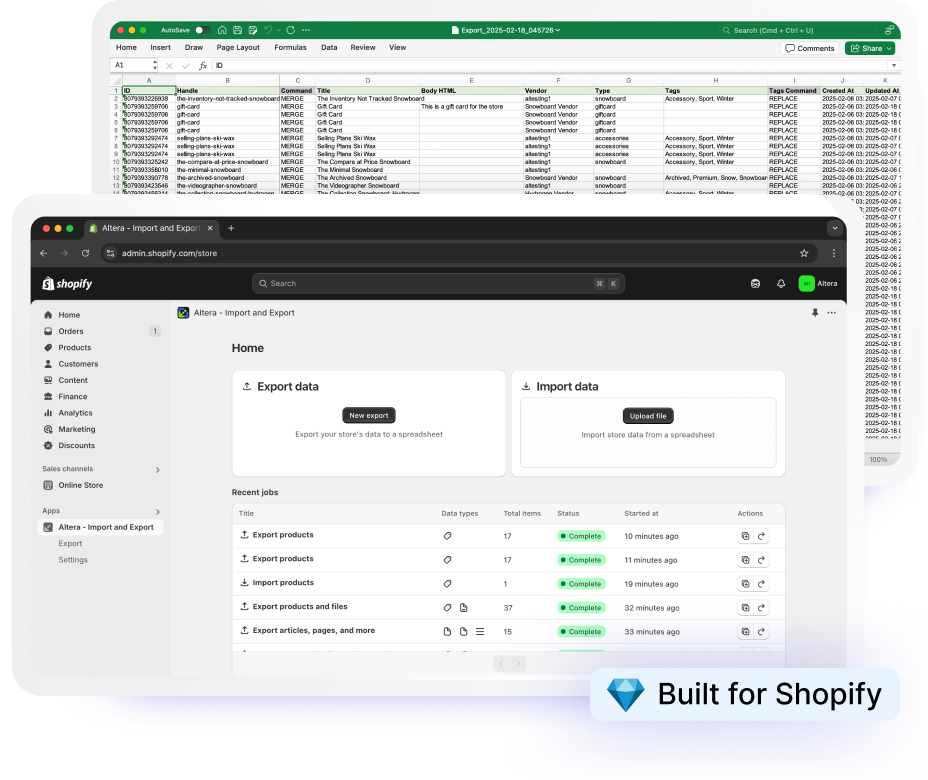
Why brands and agencies choose Altera

More of Shopify
Catalogs, Metafield Definitions, Translations and Market Adaptations, Locations. Data types others don't support.

Google Sheets Built‑In
Import and export directly from Google Drive. No downloads, no workarounds.

Ships Every Week
New Shopify features, supported fast. No waiting months for updates. See our changelog.
Same spreadsheets. Fewer gaps.

Spreadsheet out. Spreadsheet in.
Export your data
Pick a data type, choose the fields you need, and Altera writes the spreadsheet.
Edit anywhere
Work in Excel, Google Sheets, or any tool that reads CSV.
Import it back
Upload the file or point Altera at a remote source. Preview with a dry run first.
 Claude
 ChatGPT
 Sidekick
Works with Claude, ChatGPT, or Sidekick to safely run imports, exports, and edits in plain language.
What you can import and export
Altera supports 23 Shopify data types, with new ones added as Shopify ships them.
 Products & Catalog
 Customers & Orders
 Store Content
 Operations
Metaobject definitions, linked metaobject variant options, and inventory transfers are data types most import/export tools do not handle. See the full comparison.
Already using Matrixify files?
They work in Altera with zero modification. Same Excel and CSV formats, same column names, even the same colors.
Frequently asked questions
Will my existing Matrixify files work?
Yes, with zero reformatting. Altera reads and writes the Matrixify spreadsheet format, so the Matrixify files you already have work exactly as they are. Drop them in and run.
Are there row limits or speed tiers?
No. On the Developer and Pro plans, Altera has no row caps, and jobs run at the same speed, so catalogs and order histories well into the millions of records import and export without you splitting anything by hand. Large exports divide into manageable files automatically, imports process in batches, and Pro runs multiple jobs at once.
What can Altera import that Matrixify can't?
Several data types Matrixify doesn't handle: metafield definitions, metaobject definitions, catalogs, inventory transfers, locations, and market adaptations (translations scoped to a Shopify market). Metafield definitions matter most for store-to-store moves, since they carry the structure your metafields depend on. Altera also covers extra fields like payment terms, product unit prices, and country-specific HS codes.
How does the price compare?
Altera Pro is $15 a month, and it includes every data type, no row limits, and the full feature set. There are no higher tiers to climb as your store grows. Matrixify prices by capacity, so larger catalogs and bigger jobs push you into pricier plans. The clearest comparison is your own data: run the same files through both and see what each one does with them.
Can I catch problems before the import runs?
Yes. When you upload a file, Altera analyzes it before anything starts: it detects the data type, shows the column mapping and row count, and flags problems up front, including formatting and encoding issues and warnings on destructive commands like REPLACE that would overwrite existing items. You review it all on the preview screen, then start the import when it looks right.
Does it work from the command line and with AI tools?
Yes. The altera CLI runs imports, exports, and scheduled jobs from your terminal, so you can script and automate them as part of a development workflow (available on Developer and Pro plans). Altera also runs an MCP server, which lets AI assistants like Claude Code read your store structure and drive imports and exports directly. Matrixify also has an MCP server, but it has no CLI.
Is there a free plan?
Yes. The free Community plan works on any store and includes every data type, with files capped at 100 rows. If you're on a Shopify development or trial store, the Developer plan is also free and removes the row cap entirely, with full CLI access, so agencies and developers can build and test without paying.